
Focused workflowUpdated Aug 10, 2026

Prepare a contract for client-facing AI review.

To prepare a contract for client-facing AI review, select it locally, review plain-language explanations, roles, dates and the facts the client needs, replace accepted identifiers with consistent placeholders, and verify the exported copy before sharing it with an AI tool.

Local-first Reviewable Verified export

Try it free See the workflow

A local contract review workspace before AI analysis. client-facing review workflow.
Original stays on this device
For lawyers, legal operations teams and small-business owners.

Why this workflow matters

Keep the useful context. Remove the unnecessary identity.

A contract can contain party names and roles, addresses and registration numbers, signatures, exhibits and matter references. Create a controlled copy before an AI-assisted explanation or review is shared with a client. The useful context stays readable while unnecessary identity-bearing details are reviewed before export.

The goal is a working copy that still makes sense to an AI tool: relationships stay consistent, while accepted names, contacts, addresses and document-specific identifiers become controlled replacements.
A practical sequence

From original file to AI-ready copy.

Four checkpoints
01

Select the document locally

Choose a contract from your device. The original stays in the browser while its supported text and image content are prepared for review.

02

Define the AI task

Write down the output you need: plain-language explanations, roles, dates and the facts the client needs. This keeps the review focused on useful context instead of removing facts blindly.

03

Review document-specific findings

Check party names and roles, addresses and registration numbers, signatures, exhibits and matter references, then add any unique value that the detector cannot know from the document type alone.

04

Verify before sharing

Inspect the final copy for internal notes, metadata, comments and hidden identifiers. Signed pages, exhibits and scanned schedules deserve a visual check.

Document-specific review

What gets checked before export?

The detector suggests candidates; you decide what changes. For this workflow, start with the fields below and add custom findings when the document contains a unique name, project, matter or identifier.

Document-specific: party names and roles Document-specific: addresses and registration numbers Document-specific: signatures, exhibits and matter references Client-facing context: remove third-party identities and internal references Custom values you add for this document

Privacy boundary

What stays on your device.

  • The original document is not uploaded to AnonymizeDocs.
  • Extracted text, findings and replacements remain in the browser session.
  • This page's client-facing review guidance is a preparation workflow, not a confidentiality guarantee.

Human checkpoint

What still needs your judgment.

Client-facing use requires a separate accuracy and approval review; local redaction does not approve the AI output. Signed pages, exhibits and scanned schedules deserve a visual check. Keep the original file unchanged and follow the policies that apply to the document owner.

A verified export confirms accepted values were handled. It does not promise that an automated detector found every sensitive detail.

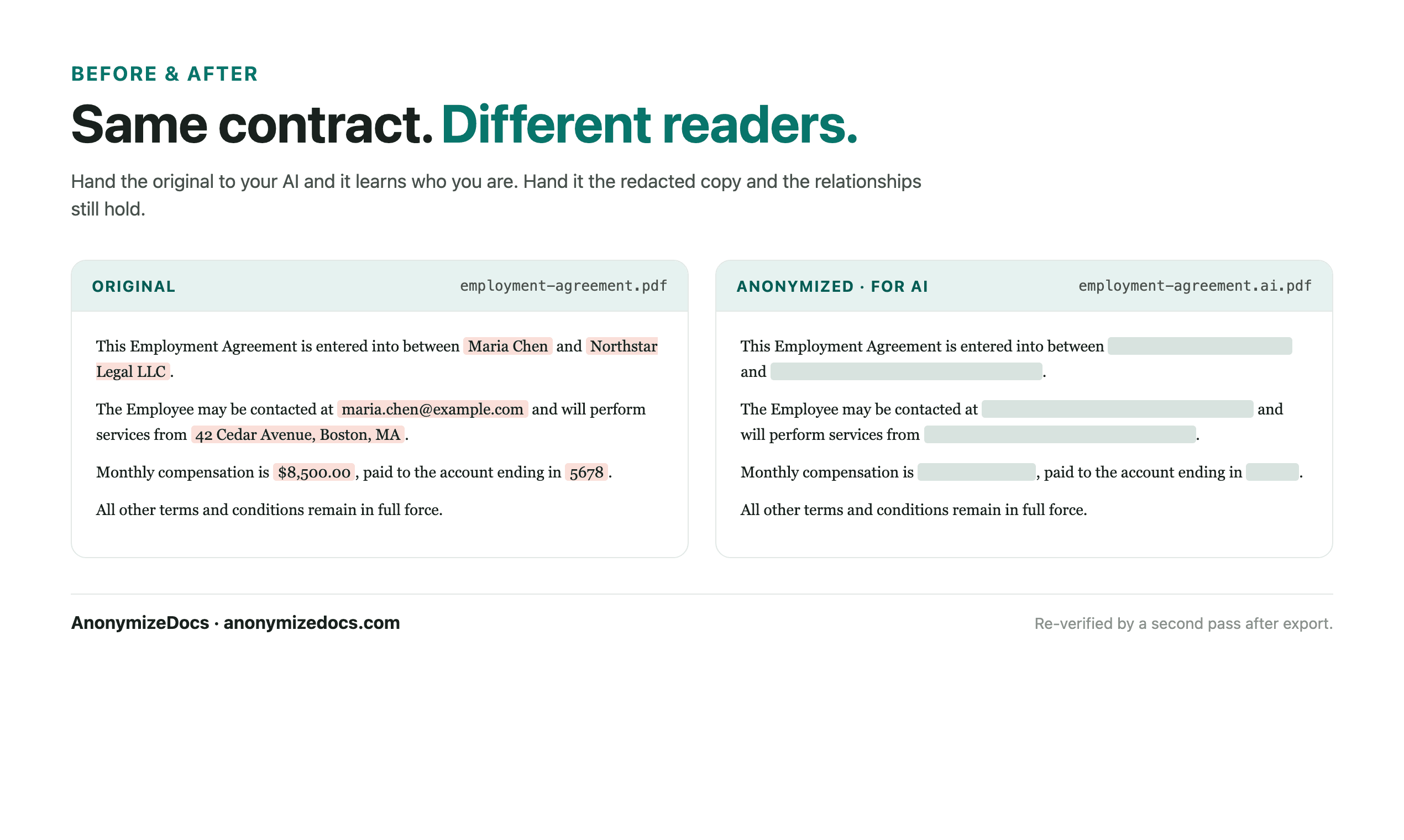
Illustrative before-and-after document preparation workflow

What a useful output looks like

Readable enough for analysis. Safer to share.

Stable placeholders let the AI distinguish one party from another without receiving the original names. Keep the clauses, dates and relationships the task needs; replace the details that identify the people, companies or matter.

Original identity-bearing valuesReview accept, ignore or editOutput reviewed placeholders or permanent redaction mode

Before you share the copy

Questions people ask about this workflow.

Can I prepare a contract for client-facing AI review without uploading the original?

Yes. Keep the content needed for the explanation and review the copy for internal notes, third-party identifiers and metadata.

What should I review in a contract before AI analysis?

Start with party names and roles, addresses and registration numbers, signatures, exhibits and matter references. Then check headers, footers, tables, images, filenames and unusual combinations of facts that could identify a person or matter.

Does this make a contract anonymous?

No. It reduces unnecessary identifiers and gives you a reviewed copy. You remain responsible for deciding what can be shared and for checking the final output.

Continue with the right depth

Related workflows and guidance.

Local document workspace

Review your next file in the browser.

Keep the original local, make the decisions yourself, and export a copy you can inspect.

Try it free